
diados
Extension of the Day

diados

5.0 FREE
  • Screenshot 1

Description

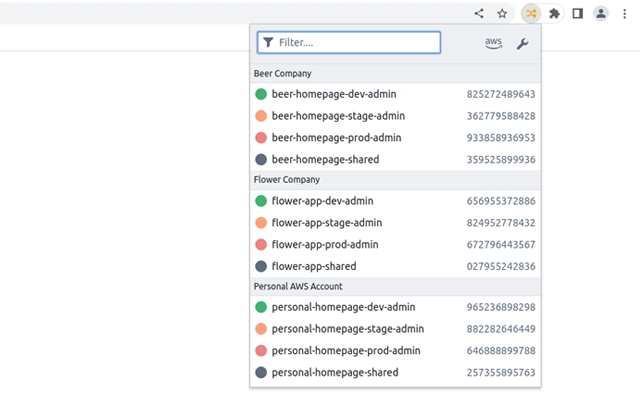
Browser plugin to quickly switch between roles on the AWS console. This plugin shows a popup with aws roles you configured via a config ini file. It can be triggered via a keyboard combination, a role can then be selected via up and down arrow keys.Features* Edit your roles in a ./aws/config style ini format via a code editor* Group roles together* Sync config via sync storage on different devices* Open popup via Ctrl + Shift + l* Navigate through roles with arrow keys, press enter to assume* Neat dark/light theme based on your browser settingsWhyYou can store up to 5 roles in the AWS console. If you have a bunch of roles over many accounts this browser plugin might be a good choice to store your roles. It can store roughly 200 roles and syncs it with browsers on other devices.You might also checkout aws-extend-switch-roles which is another browser plugin to switch roles. When i started to write this plugin i learned a lot of how the switching works. Originally i intended to contribute to this repository because i needed some features that aren’t implemented there. However, it’s written in a very oldschool style of Javascript, so i decided to rewrite it and give it a modern paint.

Guides & Tutorials for AWS Role Switch Extension for Chrome

How to install AWS Role Switch Extension for Chrome
  1. Click the Preview / Download button above.
  2. Once redirected, accept the terms and click Install.
  3. Wait for the AWS Role Switch Extension for Chrome download to finish on your device.
How to use AWS Role Switch Extension for Chrome

This software is primarily used for its core features described above. Open the app after installation to explore its capabilities.

User Reviews for AWS Role Switch Extension for Chrome 0

    No reviews found

Similar Apps


